My final project is a web-based online calculator.
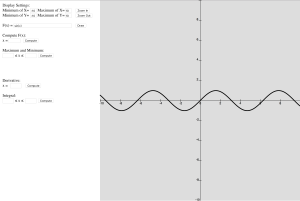
I have been studying Calculus for years since middle school. Whenever I went to class I would have to carry the huge graphing calculator (Well, it’s not that big but it’s definitely huge compared to my cellphone). Therefore, I have been looking for a graphing calculator app that can run both on my laptop and my cellphone.
When I was thinking of the final project, this idea popped into my head: Why not create an online graphing calculator of my own? It does not have to include all the functions that an actual calculator has. I just need it to have the functions that are required on a calculus class.
Then I started working. The most basic function for a graphing calculator is obviously ‘graphing’. My idea is that since a screen only has finite resolutions, then the curve shown is essentially a collection of finite pixels. So I just need to correspond points on the actual curve into pixels with their coordinates on the canvas. Then I draw a line between any two consecutive points. The lines will sum up to be a curve.
The code implementing this:
Then I move on to set up the coordinate system (for this version only cartesian system is available). In this part user can set the part of the curve that he/she wants to be displayed. It needs four parameters which are the maxima and minima of x-coordinate and y-coordinate to be shown on the canvas. Then I used two for-loops to display the line x=0 and y=0 and ten intervals on them.
The code implementing this:
Next thing to do is to allow users to type in functions to be drawn. In this part I used a javascript library called math.js. It has parse and compile functions which can parse and compile a string variable and evaluate its value.
With the main framework ready, the implementation of other functions became simple. To compute f(x) at a certain point just needed a function that returns the y-value. For derivatives I used the definition of derivative, I compute the slope of the line connecting two consecutive points. For maxima and minima I used the function in Javascript getMaxOfArray() and getMinOfArray(). And lastly for integral I used Riemann Integral which is to divide the range into 10000 intervals and calculate the sum of the area of the rectangles.
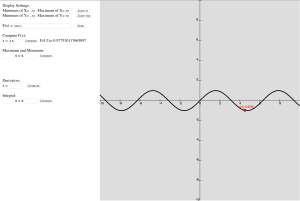
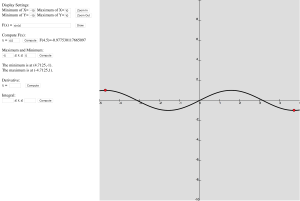
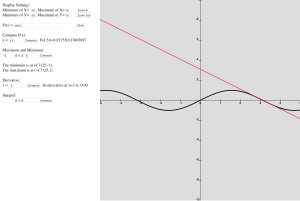
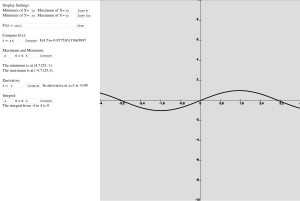
Lastly I added some interaction features. When the mouse is on the canvas there will be a point on the curve showing its coordinates and it follows the movement of the mouse. When computing values or maxima and minima the corresponding points will be marked as red. When computing derivatives the tangent line will be drawn on the canvas. My classmate Chirstos also offered a great suggestion regarding zooming functions, which were added by me yesterday.
The code implementing this:
The complete program:
However there’s still lots of work to do. For example the function input part requires user to input exactly the expression for compilation. It would be better if I add buttons that control the input like the keys on the physical calculator. Also I may adjust the resolution of the page if it is loaded on a cellphone/tablet to enhance user’s experience. Also regarding the basic functions I can also add options for drawing parametric curves and multiple functions. There are many more options to explore. I find this website very inspiring: www.desmos.com.